Three-Channel Approvals
In-App, Email, Teams
Every approval request reaches the approver via the in-app Approvals Inbox, a magic-link email with Approve/Reject buttons, and a Microsoft Teams Approval card. Approver responds in any channel.
Visual Diagrams. Three-Channel Approvals. Idempotent & Auditable.
Synesis CMMS Approval Workflows manage the entire approval lifecycle for work order requests, scope changes, high-cost completions, PM modifications, calibration certifications, and outsourced service authorizations. Every request creates a task in the in-app Approvals Inbox, sends a magic-link email with one-click Approve/Reject buttons, and posts a Microsoft Teams Approval card in the approver's Teams. The first response from any channel wins; the others stay live but become idempotent.
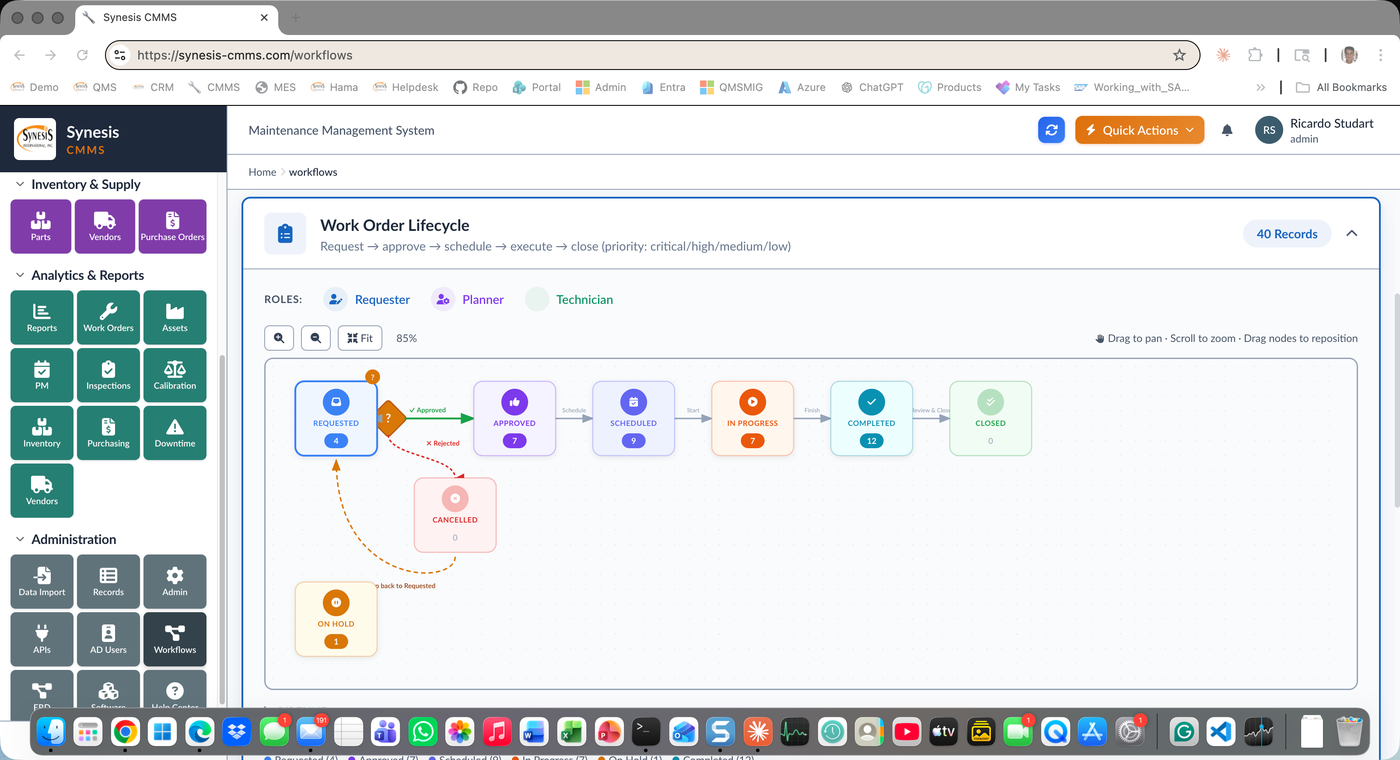
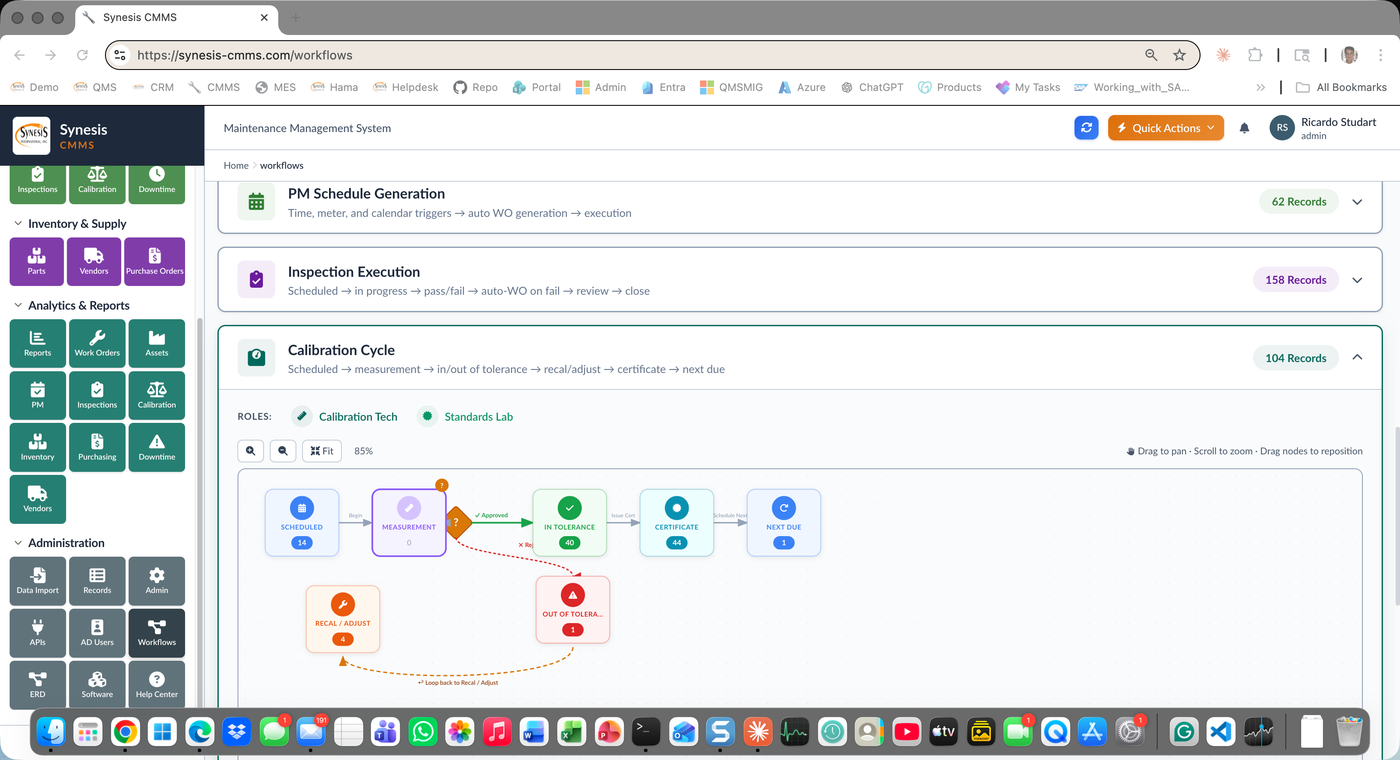
Each workflow is visualized as an interactive diagram with pan, zoom, and drag — Work Order Lifecycle, PM Schedule Generation, Inspection Execution, and Calibration Cycle each have their own canvas with decision diamonds, approved arrows, and rejection loopback paths. Click any node to see the records currently in that state. Every approval is logged with user, timestamp, channel, and decision rationale.
In-App, Email, Teams
Every approval request reaches the approver via the in-app Approvals Inbox, a magic-link email with Approve/Reject buttons, and a Microsoft Teams Approval card. Approver responds in any channel.
Pan, Zoom, Drag
Each workflow is rendered as an interactive SVG diagram with decision diamonds, approved paths (green), rejection loopback paths (red dashed), and node counts showing records currently in each state.
Idempotent by Design
First approver response is committed. Subsequent clicks in any other channel are safe no-ops. No double-approvals, no race conditions.
Approve from Anywhere
Approval emails contain HMAC-signed magic links that expire after 14 days and become invalid after first use. Approve or reject from any device, no login required.
Native Approval Cards
Native Microsoft Teams Approval cards. Approver decides in Teams, response syncs back to the CMMS in seconds via Graph API webhooks.
Configurable per Module
Configure separate Reviewer and Approver roles per workflow. Add escalation timers. Route by amount, criticality, or asset class.
Work Order, PM, Calibration
Work Order Lifecycle, PM Schedule Generation, Inspection Execution, Calibration Cycle, and outsourced service authorization each have configurable approval paths.
Who, When, How, Why
Every approval action logged: approver, timestamp, channel (in-app/email/Teams), decision (approve/reject), comments, and digital signature.
Electronic signatures with user authentication, audit trail, and decision history. Validated workflow with controlled access and immutable records.
Controlled documented information. Approval workflow ensures only authorized changes are made. Complete review and approval evidence.
Computerised systems for regulated environments. User access controls, audit trail, and electronic signatures meeting EU pharmaceutical requirements.
Information security and access controls. Approval workflows enforce separation of duties, least-privilege access, and complete activity logging.
Approval workflow software manages the review-and-sign-off lifecycle for maintenance actions — work order requests, scope changes, high-cost completions, PM modifications, calibration certifications, and outsourced service authorizations. Synesis CMMS routes each request to the right reviewer and approver, records every decision, and won’t let a gated action proceed until it’s authorized. The result is that spend, safety-critical work, and regulated changes all pass through a controlled, documented gate instead of informal email or verbal approval.
Every approval request simultaneously creates a task in the in-app Approvals Inbox, sends a magic-link email with one-click Approve/Reject buttons, and posts a Microsoft Teams Approval card to the approver. The approver responds in whichever channel they are already in, and the first response from any channel wins while the others become safe no-ops. Reaching people where they already work is what keeps approvals from becoming the bottleneck that stalls maintenance.
Yes — the workflow is idempotent by design. The first approver response is committed, and any later clicks in another channel are safe no-ops, so there are no double-approvals and no race conditions even when a request went out over three channels at once. Magic-link emails are HMAC-signed, expire after 14 days, and become invalid after first use, so an approval cannot be replayed or forged.
Every approval action is logged with the approver, timestamp, channel, decision, comments, and digital signature, producing an immutable audit trail. That electronic-signature and access-control model maps to FDA 21 CFR Part 11, ISO 9001 §7.5.3 controlled documented information, EU GMP Annex 11, and SOC 2 / ISO 27001 separation-of-duties requirements. Interactive workflow diagrams also show which records sit in each state, so an auditor can see the process and its current evidence at a glance.
Show us your current approval bottleneck and we'll map it onto a Synesis CMMS workflow on the spot.
Request a Demo