Multi-Level BOMs
Roll-Up Structure
Unlimited levels from raw material to finished good. Subassemblies, intermediate parts, and end items all in one structure. Cost and lead-time roll-up at any level.
Multi-Level Visual BOMs with Revisions, Effective Dating, and Where-Used
Synesis MES Bill of Materials replaces scattered Excel BOMs, paper drawings, and CAD-only product structures with a connected, version-controlled BOM system. Multi-level BOMs roll up from raw material through subassemblies to finished goods. Every component has its quantity, scrap factor, position, alternate parts, and effective date. Visual BOM views — top-down, left-to-right, indented — let engineers, planners, buyers, and operators all see the structure their way.
BOMs are version-controlled. Engineering changes go through Synesis QMS change control with impact assessment, multi-stage approval, and automatic propagation to affected work orders. Where-used analysis answers "what products use this component?" instantly. Phantom parts, alternates, and substitutes are first-class citizens.
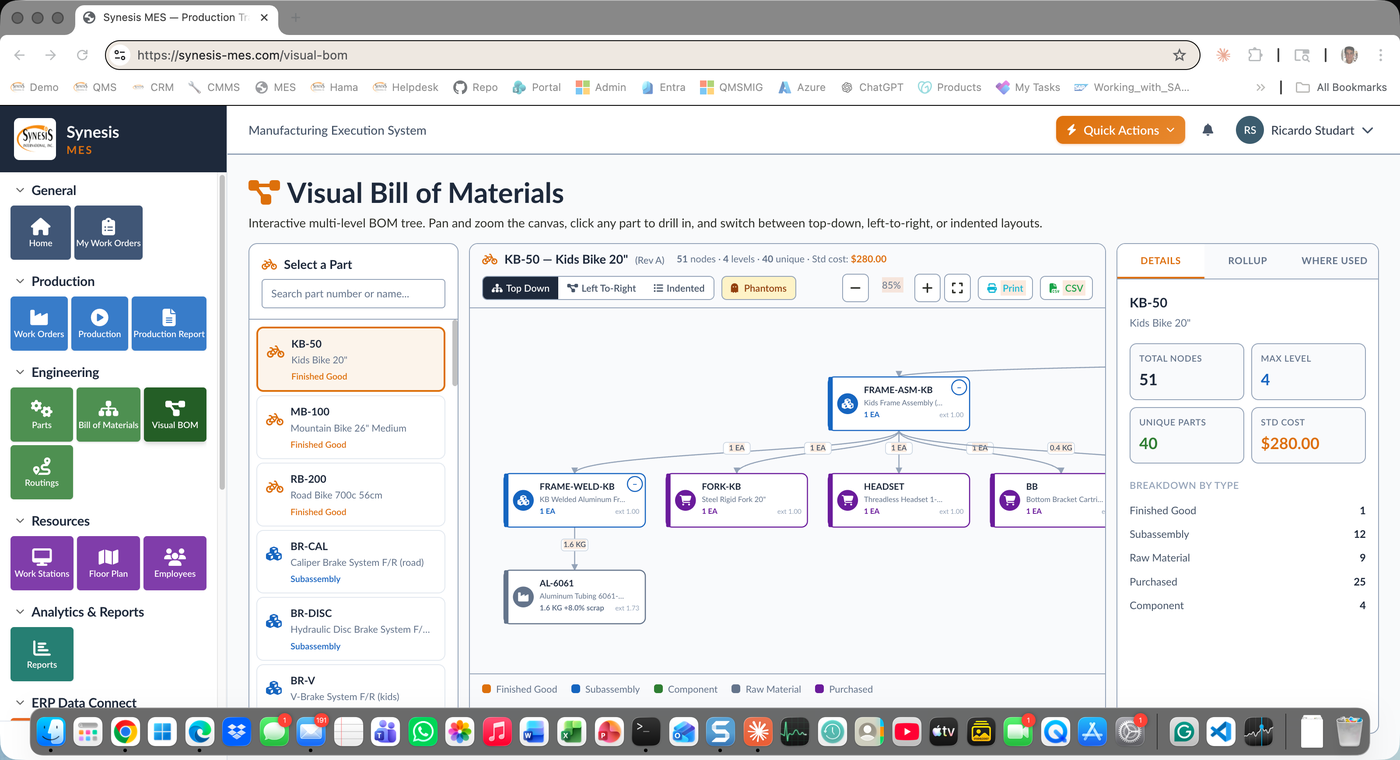
Roll-Up Structure
Unlimited levels from raw material to finished good. Subassemblies, intermediate parts, and end items all in one structure. Cost and lead-time roll-up at any level.
Top-Down, Left-to-Right, Indented
Multiple visual modes for the same BOM. Engineers prefer top-down. Buyers prefer indented. Operators prefer left-to-right. Same data, three views, click to switch.
Effective Dating
BOM revisions with effective-from and effective-to dates. New revisions don't disturb in-process work orders. Old revisions remain available for audit and warranty support.
Component-to-Product
From any component, see every BOM that uses it across every revision. Critical for engineering change impact, supplier issue tracing, and obsolescence management.
Buyer Flexibility
Alternates with priority. Substitutes with approval gates. Phantom parts for kit assemblies. AVL (Approved Vendor List) per component when relevant.
Realistic Material Planning
Per-component scrap factor for accurate purchasing. Yield factors at routing operations for accurate WIP and finished good costing.
QMS Change Control
BOM revisions flow through Synesis QMS change control with impact assessment, multi-stage approval, training updates, and document control before they release.
Standard & Actual
Standard cost roll-up from purchase prices and routing labor. Actual cost roll-up from production posting. Variances surface where reality differs from plan.
New product BOMs release through formal engineering change control with multi-stage approval, training, and document propagation.
Purchasing demand calculated from BOM × work order quantity, with scrap factors and on-hand inventory netting. Supplier visibility per component.
Operators see the BOM at the workstation. Component issuance is BOM-driven. Substitutions documented in real time.
BOM-driven inspection plans. Component traceability from finished good back through subassemblies to raw material lots.
A bill of materials is the structured list of every component, subassembly, and raw material that goes into a finished product, with quantities, positions, and relationships. Synesis MES BOM software replaces scattered Excel BOMs and CAD-only structures with a connected, version-controlled multi-level BOM that rolls up from raw material through subassemblies to finished goods. Because the structure is a single source of truth, engineering, planning, purchasing, and the shop floor all work from the same product definition instead of reconciling their own copies.
Where-used analysis answers the reverse of a BOM: instead of “what goes into this product?” it tells you “what products use this component?” across every BOM and every revision. That instant reverse lookup is what makes engineering change impact, supplier-issue tracing, and obsolescence management manageable — when a part is discontinued or a supplier flags a defect, you immediately see every finished good and subassembly affected. Without it, tracing a single component through a large product catalog is a manual, error-prone hunt.
Every BOM in Synesis MES is version-controlled, and revisions carry effective-from and effective-to dates so a new revision takes over on its effective date without disturbing work orders already in process. Older revisions stay available for audit, warranty support, and answering “which BOM built this lot?” long after the change. That effective-dating discipline is what lets a plant roll out engineering changes cleanly instead of forcing an all-at-once cutover.
BOM revisions flow through Synesis QMS change control with impact assessment, multi-stage approval, training updates, and document control before they release, so no structural change reaches the floor unreviewed. Per-component scrap and yield factors feed accurate purchasing and costing, and the BOM drives inspection plans and lot traceability from finished good back to raw material. When paired with ERP Connect, the same BOM stays synchronized with the ERP’s engineering master, eliminating duplicate maintenance.
See Synesis MES BOM in action with your product structures and your engineering change processes.
Request a Demo